


Grifols Plasma Donor Hub
4.74.45K Reviews
App Specs
- Version
- 13.6.5
- Updated On
- License
- Free
- Downloads
- 1,000,000+
- Developer
- GRIFOLS SA
- Categories
- Medical
- Platform
- Android, iOS
Screenshots
 Analysis by AppCompare
When I’m deciding whether a donor app is worth keeping on my phone, I look beyond the booking screen: does it help me prepare, keep track of what I’ve done, and make the next visit easier without becoming a substitute for the donation center? Grifols Plasma Donor Hub is a free medical app from GRIFOLS SA, built around the practical routine of donating plasma. It has a 4.7 average from around 39,000 ratings, and more than a million installs, so it’s clearly reached many donors. My view is that it is most useful when you already donate at a Grifols center and want one place for the related tasks.
What to check before relying on it
The key decision is whether you need a center-specific companion or a general health tool. This app is focused on plasma donation rather than broad medical records, symptom tracking, or care coordination. That focus can be a real advantage: donation-related history, appointment planning, and center information are easier to keep together than in a calendar, notes app, and a stack of reminders. It also means the app is not a universal donor account for every organization. If your donations are spread across different providers, you may still need separate systems.
I would also treat the app as a convenience layer, not as the authority on whether I’m eligible to donate on a particular day. Educational material can help me understand the process, but personal health questions and center-specific decisions belong with the staff. That distinction matters most for a first-time donor or anyone whose health circumstances have changed. Having information on a phone is useful; it does not replace a conversation with the people responsible for screening and care.
Where the app earns its place
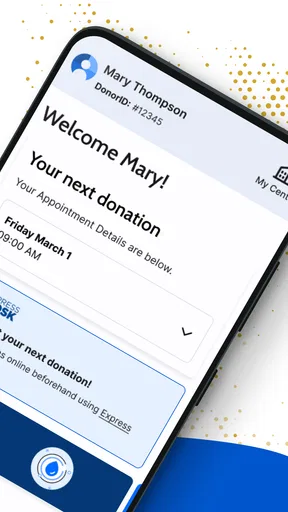
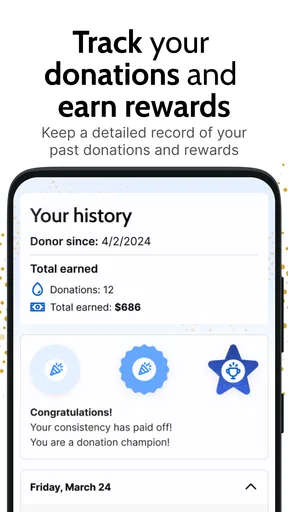
For an established donor, the strongest case is reducing small bits of friction across repeat visits. Instead of trying to remember when I last went, I can use the donation record as a reference, then plan the next appointment around my actual week. Seeing the history and any available rewards in the same donor-focused setting is more relevant than keeping a generic note that says “plasma visit.” It makes the app feel purpose-built rather than like a calendar with a different label.
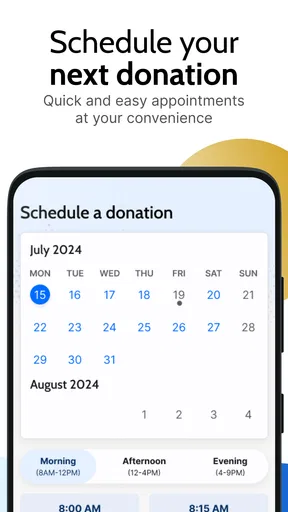
A realistic example: I’m planning errands for a busy week and want to fit in a donation without guessing at the appointment process. I can check the app’s available appointment slots, choose a time that works, and use a reminder so the visit doesn’t disappear among work and household plans. Afterward, the record gives me a place to look back before arranging another visit. That sequence—plan, remember, review—is where a dedicated app can help more than a paper calendar.
One useful habit is to check the appointment details again before leaving, rather than relying on memory or an old notification. I’d also keep any important center instructions somewhere I can reach them, especially if I’m new to donating. Reminders are helpful prompts, but they are not a substitute for confirming the time or following the center’s current guidance. This small bit of caution makes a digital schedule more dependable.
When a different option may suit you better
If you donate only occasionally, a regular calendar may be enough. It can hold a visit time without requiring you to learn another interface, and it may be easier if you already manage all appointments there. A general notes app can also work for simple personal reminders, but it will not provide the donation-centered context that makes this app useful to repeat donors. The trade-off is convenience versus keeping everything in one familiar place.
Worth Reading Before You Choose

EA SPORTS FC Mobile 26 Is a Bigger Football Game, but It Takes Time

Flipboard Shows What News Apps Must Do Beyond the Feed

Switching to Android Auto Means Rethinking Your Driving Routine

Google Calendar Makes a Crowded Week Easier to Manage

Ludo King Makes the Most of the Minutes Between Plans

Baby Panda World Brings Quick Play to Modern Phones, but Its Game Library Feels Busy
If you use more than one plasma provider, expect the donor hub to serve its own ecosystem rather than consolidate every visit. A general health app may be a better home for a wider picture of appointments and wellness, while this app is more focused on the Grifols donation routine. Neither approach is automatically better: the right choice depends on whether your main problem is managing all health activity or staying organized around one donation provider.
The app is also not the right choice for someone looking for medical diagnosis, urgent advice, or a replacement for direct contact with a donation center. For those needs, an appropriate clinician or center staff member is the better route. I would be cautious about assuming that an in-app resource answers a personal eligibility question, since general educational guidance cannot account for every individual situation.
Switching without losing your routine
Moving from a paper calendar or a general reminder app is less about transferring technology and more about deciding where you want the donation routine to live. Before relying on a new system, I’d check that I can access the account, find the appointment area, and understand where the history and educational content sit. If you’re used to a calendar alert, keep that familiar backup until you’re confident that the app’s reminders fit your habits. That is not a criticism of the app; it is a sensible way to avoid missing a visit during a change in routine.
For someone new to Grifols, I’d begin by exploring the educational information and center-related options before booking anything. A first appointment can involve questions that a booking screen cannot answer, so contacting the center directly may be the better first move. Once the process is familiar, the app can take over the repeatable tasks: checking appointments, reviewing past donations, and keeping reminders in one place. That gradual handoff is more practical than expecting an app to make the whole donation process self-explanatory.
Donor Hub is free and rated for Everyone, which makes it easy to try without paying for another organizer. It was released on November 9, 2021, and version 13.6.1 requires Android 7.0 or later. I’d still check that the app is suitable for the device and operating system I plan to use, particularly if I rely on an older phone. Those details matter less than whether the app supports the center and routine I actually use, but they are worth checking before making it my only reminder system.
Using the app as part of a donation routine
First things first, setting up the Grifols Plasma Donor Hub is a breeze. If you’re like me and not a fan of complex setups, you’ll appreciate how simple it is. You just download it from the App Store or Google Play, punch in some basic info, and voilà, you’re in!
The interface is super user-friendly, which is always a win in my book. Everything is laid out clearly, so you won’t find yourself getting lost or confused. The app is designed to make your life easier, not more complicated.
Track Your Donations
One of the coolest features is the ability to track your donations. I mean, who doesn’t love seeing their progress, right? The app keeps a neat record of all your past donations, and it even shows you your donation history. This is perfect if you’re trying to keep tabs on how often you donate.
There’s also a rewards system, which is a nice little perk. You can see what rewards you’re eligible for based on your donation count. It’s like a little pat on the back for being a superstar donor!
Booking Appointments Made Easy
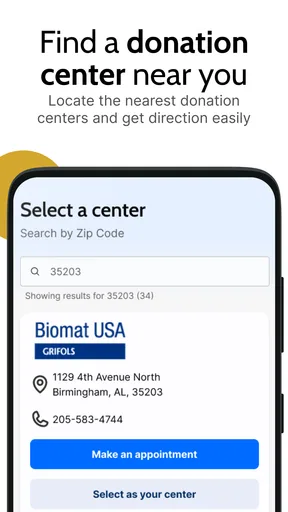
Now, let’s talk about booking appointments. This app makes it so easy to schedule your next donation. You don’t have to call or wait in line. Just a few taps on your phone, and you’re set. The calendar feature lets you see available slots, so you can pick what suits your schedule best. No more back-and-forth hassles!
Staying Informed
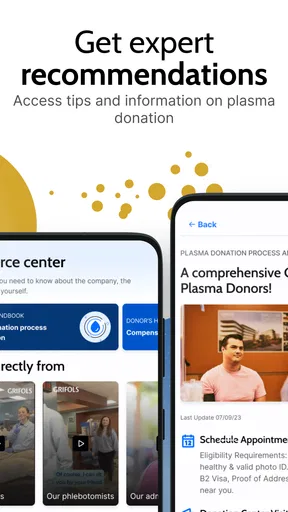
If you’re curious about the nitty-gritty of plasma donation, the app’s got you covered. It provides educational resources and FAQs, which are super handy if you’re new to this whole donation scene. Plus, you’ll get updates on any changes or new policies at your favorite donation center.
Oh, and did I mention notifications? You can opt to receive reminders for your upcoming appointments, so you’ll never miss a session. This is a lifesaver for someone like me who’s always juggling a million things at once.
Security and Support
Now, I know security is a big deal for us all. The app uses secure protocols to keep your personal info safe. It’s reassuring to know they’ve got your back on this.
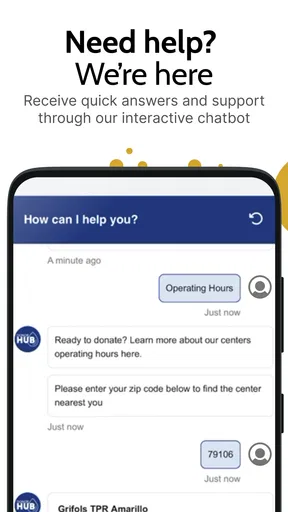
And if you ever run into any hiccups, their support team is just a tap away. You can reach out directly through the app if you have questions or need assistance.
My recommendation
All in all, the Grifols Plasma Donor Hub app is a fantastic tool for anyone involved in plasma donation. It simplifies the whole process, makes tracking donations a breeze, and keeps you informed. Plus, the easy appointment scheduling is a total game-changer.
If you’re a regular donor or even just considering it, I highly recommend checking this app out. It’s like having a personal assistant for your donation journey. Happy donating!
Pros
- Easy-to-navigate interface.
- Real-time donation tracking.
- Personalized donation reminders.
- Secure data management.
- Incentive tracker included.
Cons
- Limited customer support options.
- Only available in select regions.
- Occasional app crashes reported.
- Requires frequent updates.
- No offline access to features.
FAQs for Grifols Plasma Donor Hub
What is the Grifols Plasma Donor Hub app used for?
The Grifols Plasma Donor Hub app is designed to help plasma donors manage their donation schedules, track their donation history, and access rewards. It serves as a convenient tool for donors to stay informed about their contributions and any updates related to the donation process.
How do I schedule a donation appointment using the app?
To schedule a donation appointment, simply log in to the Grifols Plasma Donor Hub app, navigate to the ‘Appointments’ section, and select a convenient date and time. The app allows you to view available slots at nearby donation centers, making scheduling quick and easy.
Does the app provide information on donor eligibility requirements?
Yes, the Grifols Plasma Donor Hub app provides detailed information on donor eligibility requirements. You can find guidelines on age, health status, and other criteria that must be met to donate plasma, ensuring that you are well-prepared before visiting a donation center.
Can I track my rewards and incentives through the app?
Absolutely, the app features a dedicated section for tracking your rewards and incentives. After each donation, you can check your accumulated points or credits, view available rewards, and redeem them directly through the app, making it easy to manage your donor benefits.
Is my personal information secure in the Grifols Plasma Donor Hub app?
Yes, the Grifols Plasma Donor Hub app employs advanced security measures to protect your personal information. Data encryption and secure login protocols are used to ensure that your personal and donation details remain private and safe from unauthorized access.


